> For the complete documentation index, see [llms.txt](https://everythingblackkk.gitbook.io/everythingblackkk/llms.txt). Markdown versions of documentation pages are available by appending `.md` to page URLs; this page is available as [Markdown](https://everythingblackkk.gitbook.io/everythingblackkk/offensive-security/c2-server-via-youtube.md).
# C2 Server Via YouTube
## Innovative C2 Tool Using YouTube Comments
Remote control of devices through a C2 Server has become a widespread topic in Red Teaming and security testing, but what’s interesting is how people continuously innovate new methods to avoid monitoring and hide traffic.
Today we’ll talk about a tool and concept I created that allows you to use YouTube comments as a means to communicate with the victim’s device and execute commands on it.
## What Does This Tool Do?
The tool reads comments from a specific YouTube video (which you define), and if it finds a comment written in a specific format starting with `run:`, it understands that this is a command that needs to be executed.
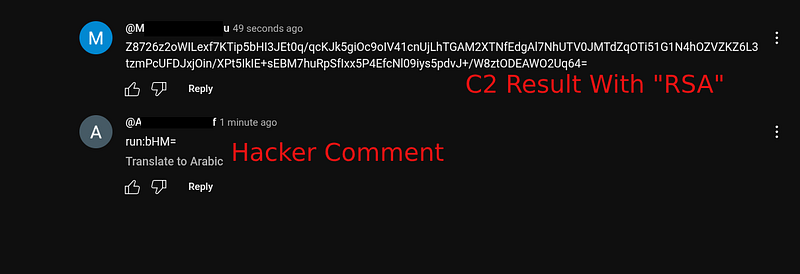
It decrypts the command, executes it on the device, and then takes the result, encrypts it with an RSA key, and posts it as a new comment on the same video.
This way, communication between you and the device happens through the YouTube API, without any direct connection or known IP, helping you avoid any systems monitoring traffic.
#### Benefits of This Method
* Using YouTube as a communication intermediary makes the traffic look “very normal,” as you’re interacting with YouTube like any other program or browser
* Nothing unusual happens on the network; everything appears to be just a script reading comments and writing regular comments
* There’s no fixed IP that can be linked to the attack, as all interaction happens through an encrypted channel (Google’s servers)
* Excellent as a PoC for a camouflaged C2 idea, suitable for experiments and research
## Setup Steps
#### 1 — Create a YouTube API Key
* Go to Google Cloud Console:\
* Create a new project and enable YouTube Data API v3
* Then create a Credential of type API Key, and copy it
* Place the API Key where `"___"` is in the script
#### 2 — Specify the Video to Work With
* Take the Video ID from the video link\
Example: if the video link is `https://youtube.com/watch?v=abc123`\
Then the Video ID is `abc123`
* Place it where `"___"` is in the script
#### 3 — Set Up OAuth to Be Able to Send Comments
* Create an OAuth Consent Screen in Google Console (External type)
* Create an OAuth Client of Desktop App type
* Download the `client_secrets.json` file
* Place it next to the script
* The first time you run the script, it will ask you to log in with a Google account and give permissions
**4 — Run the script**
> **Note:** In the **OAuth Consent Screen**:
>
> * Add the scope: `https://www.googleapis.com/auth/youtube.force-ssl`
> * Enable either **Testing** or **Publishing** mode depending on the current stage.
> * Add your email under **Test users**
>
> In the **OAuth client settings**:
>
> * The **Redirect URI** must exactly match the one used in the code:\
> `http://localhost:8080/`
You Can See The Tool And Repo Here :
{% embed url="" %}
> ## *⚠️ It’s just a POC, not intended for practical use.*
```
python3 NoTube.py
```
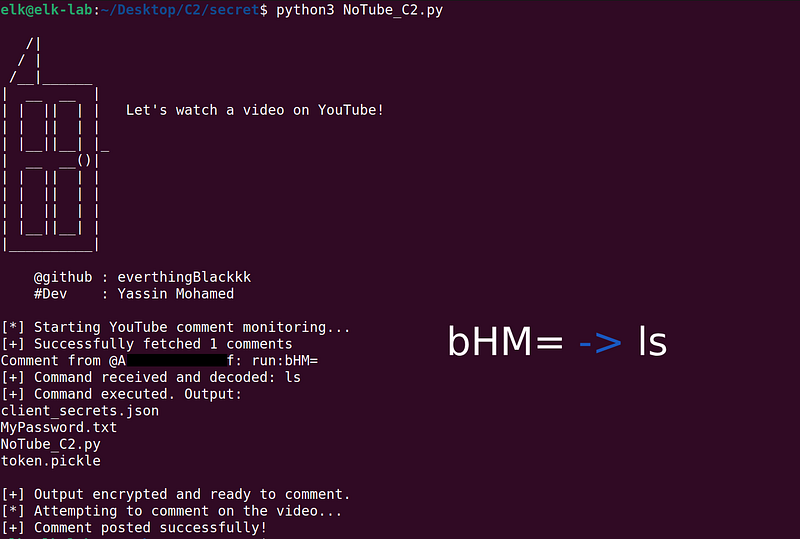
It will start reading comments, looking for any comment starting with `run:`, decrypt it, execute it, and then write the execution result as an encrypted comment on the same video.
## Example of command usage
If you want to send a command to run on the device, such as `ls`, encrypt it with base64 and write it in a comment like this:
```
run:bHM=
```
The tool will decrypt and execute it, then send you the result in a comment, but not in a clear form—it will be encrypted with RSA.
## Where's the security here?
What makes this method different is that everything happens amidst natural noise. No one would think that traffic going to and from Google APIs and YouTube is part of C2 communication.
Also, the execution result is sent encrypted, preventing anyone on the network from understanding what commands you're sending.
## Important warning
This is a tool for experimentation and education only. Using it for anything outside a testing environment or without explicit permission is considered illegal activity.
This article is meant to open your mind to how unexpected tools can be used to create C2 channels.
## Thank you all! I hope you enjoyed the article. If you have any questions, I’m here to help.
Remember My name : everythingBlackkk
Made by ❤
Github :
Linkedin : [www.linkedin.com/in/everythingblackkk](http://www.linkedin.com/in/everythingblackkk)
X :